 |
Windows Update BlockerReliable, Policy-First Windows Update Control |
||||||||||
|
Windows Update BlockerWindows Update Blocker (WUB) is a lightweight utility that puts Windows Update services under your control. Switch updates on or off with one click, lock your preferred state, and keep your systems predictable during work, labs, and maintenance windows.
Current Release - Windows Update Blocker 1.9Release date: January 21, 2026Version 1.9 is the latest verified build focused on stable service control and clear status reporting. Download Windows Update Blocker to enforce your update policy without manual service edits. What Windows Update Blocker DoesWUB manages the Windows Update service layer so you can schedule updates on your terms. It runs without installation, stays portable, and keeps system changes minimal while preserving your chosen state. Core Capabilities
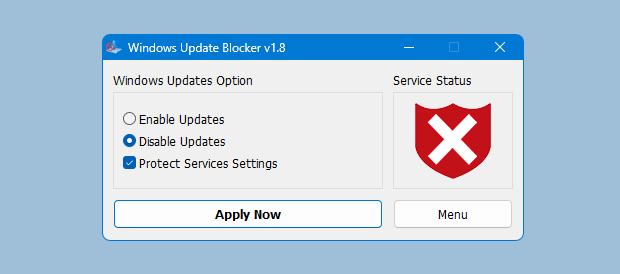
Control Updates in Three StepsStep 1: Download and launchExtract the archive and run the executable. No installation or system setup is required. Step 2: Choose update modeSelect Disable Updates to pause automatic changes or Enable Updates when patching is planned. Step 3: Apply and confirmApply the setting and verify the status indicator. Turn on protection to lock the state.
Advanced Admin ToolkitWUB includes admin-friendly controls for scripted environments and larger fleets.
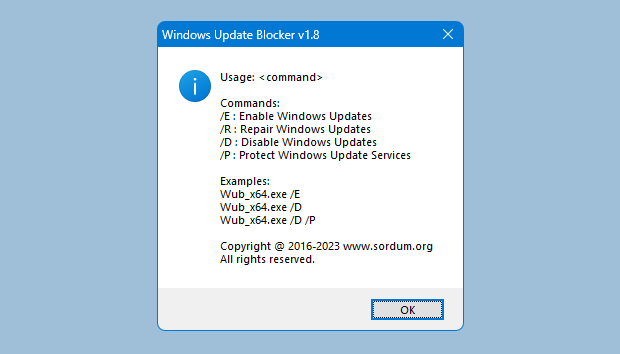
Command Line ParametersUse the CLI for scripted control in admin workflows, labs, and enterprise deployments. Why Teams Choose WUB
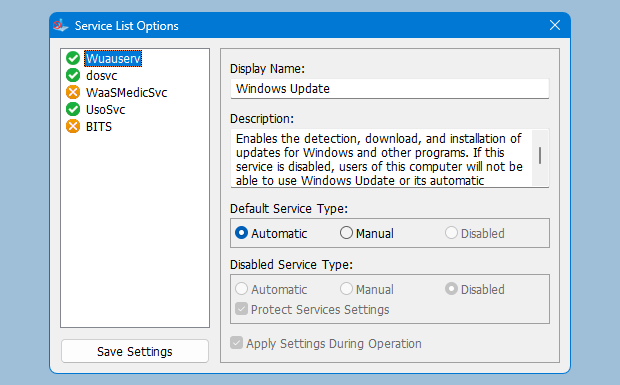
Additional BenefitsA clear interface and visible status indicators keep update control transparent and easy to verify.
Trust, Transparency, and Responsible Use
System Requirements
Get Windows Update BlockerGet the latest release from the download page and review the features list to confirm it fits your workflow. |
||||||||||
| © 2026 Windows Update Blocker. All rights reserved. . |